

Snowflake Continuous Data Pipelines
Snowflake continuous data pipelines enable near-real-time ingestion, transformation, and analytics using Snowpipe, Streams, Tasks, and Dynamic Tables. They automatically process incremental data changes, reduce ETL complexity, and support scalable, event-driven architectures for real-time BI, AI workloads, and enterprise decision-making on the Snowflake Data Cloud.
Introduction: Why Continuous Data Pipelines Matter Now
Modern businesses expect analytics, dashboards, and AI models to reflect what’s happening right now—not hours later. However, many organizations still rely on batch-based ETL pipelines that introduce delays, operational overhead, and rising costs. Snowflake Continuous Data Pipelines solve this gap by enabling near–real-time, automated, and scalable data ingestion and transformation directly within the Snowflake Data Cloud.
Real-Time Data Expectations vs Batch ETL Limitations
Today’s data consumers—business leaders, analysts, and AI systems—expect:
- Real-time dashboards and alerts
- Instant access to operational data
- Continuously updated ML features and metrics
Traditional batch ETL pipelines were designed for daily or hourly refresh cycles, not continuous analytics. As data volumes and data sources grow, batch processing struggles to keep up with modern expectations, especially in cloud-native environments.
This mismatch is the core driver behind the shift to continuous data pipelines in Snowflake.
Challenges with Traditional Data Pipelines
Legacy and batch-based pipelines introduce several critical challenges:
High Data Latency
Batch jobs delay insights by minutes or hours, making real-time decision-making impossible.
Escalating Infrastructure Costs
Always-on ETL servers, external streaming platforms, and complex orchestration tools drive up cloud spend.
Operational Complexity
Managing multiple tools (ETL, streaming, orchestration, monitoring) increases failure points and maintenance effort.
Poor Scalability
Batch pipelines often break under high-volume or high-velocity data workloads.
Snowflake continuous pipelines reduce these issues by processing data incrementally, automatically, and natively within Snowflake.
Why Enterprises Are Shifting to Continuous Pipelines in Snowflake
Enterprises are adopting Snowflake continuous data pipelines because they offer:
- Near real-time ingestion using Snowpipe and Snowpipe Streaming
- Automated transformations with Dynamic Tables and Streams & Tasks
- Elastic scaling without infrastructure management
- Lower total cost of ownership by minimizing external tools
- Unified analytics and AI-ready data in a single platform
By keeping ingestion, transformation, governance, and analytics inside Snowflake, organizations simplify architecture while improving speed and reliability.
What Are Continuous Data Pipelines in Snowflake? (Core Concept)
Definition: Continuous Data Pipelines in the 2026 Context
Continuous data pipelines in Snowflake are cloud-native, event-driven workflows that ingest, process, and transform data incrementally and automatically as new data arrives—without relying on fixed batch schedules. In 2026, these pipelines are designed to support real-time analytics, AI workloads, and data products directly inside the Snowflake Data Cloud.
Unlike traditional ETL pipelines that reprocess entire datasets at intervals, Snowflake continuous pipelines operate on only new or changed data, ensuring faster insights, lower costs, and simpler operations.
Continuous vs Batch Pipelines
|
Aspect |
Batch Pipelines |
Continuous Pipelines in Snowflake |
|
Data freshness |
Minutes to hours |
Seconds to near real-time |
|
Processing model |
Time-based schedules |
Event-driven, incremental |
|
Cost efficiency |
High due to reprocessing |
Optimized by processing deltas only |
|
Scalability |
Limited by batch windows |
Elastic, auto-scaling |
|
AI & streaming readiness |
Poor |
Native support |
Batch pipelines still have a place for historical backfills and low-frequency workloads, but continuous pipelines are now the default for modern Snowflake architectures.
Event-Driven and Incremental Processing
In Snowflake, continuous pipelines are powered by:
- Event-driven ingestion using Snowpipe and Snowpipe Streaming
- Change data capture (CDC) via Streams
- Automated transformations with Tasks and Dynamic Tables
Each component reacts to data arrival events, not fixed schedules. This means:
- New files are ingested immediately
- Table changes are tracked automatically
- Downstream transformations run only when needed
The result is a responsive, self-updating pipeline that aligns with real-world data flow.
Why Continuous Pipelines Matter in 2026
AI-Ready Analytics
Modern AI and ML systems require fresh, continuously updated data. Feature stores, real-time scoring models, and generative AI applications break down when data is stale.
Snowflake continuous pipelines ensure:
- Up-to-date training and inference data
- Reliable feature freshness for Snowflake Cortex and external ML tools
- Faster experimentation and model deployment cycles
Without continuous pipelines, AI initiatives stall before delivering value.
Real-Time BI & Operational Dashboards
Business users no longer accept yesterday’s data. In 2026, real-time dashboards are standard for:
- Revenue and customer activity monitoring
- Supply chain and logistics tracking
- Fraud detection and risk alerts
Continuous pipelines feed BI tools with near real-time metrics, enabling operational decisions—not just retrospective reporting.
Data Products & Domain-Oriented Data Meshes
As organizations move toward data mesh and data product architectures, continuous pipelines become foundational.
They enable:
- Domain-owned data products with automated freshness
- SLAs on data availability and quality
- Decoupled teams building and consuming data independently
Snowflake’s continuous pipeline capabilities support this shift by combining governance, scalability, and automation in a single platform.
Snowflake Continuous Data Pipeline Architecture
Snowflake continuous data pipeline architecture is designed to deliver near–real-time, scalable, and low-maintenance data flows entirely within the Snowflake Data Cloud. Unlike legacy ETL architectures that rely on multiple external tools, Snowflake’s native services enable event-driven ingestion, incremental processing, and analytics-ready data with built-in governance and security.
This architecture is optimized for 2026 data workloads, including real-time BI, AI/ML feature pipelines, operational analytics, and enterprise-scale data sharing.
Core Building Blocks
Each component plays a specific role in enabling continuous, automated data movement from source to consumption.
Snowpipe & Snowpipe Streaming
Snowpipe is Snowflake’s serverless, event-driven ingestion service for continuously loading data as soon as it arrives in cloud storage.
Snowpipe Streaming extends this capability for high-throughput, low-latency use cases such as application events and IoT data.
Key capabilities:
- Near–real-time data ingestion (seconds-level latency)
- Auto-scaling with pay-per-use pricing
- Native integration with cloud storage and applications
- No infrastructure or cluster management
Best for:
SaaS data feeds, application logs, event streams, and operational data ingestion.
Streams (CDC & Change Tracking)
Snowflake Streams capture change data (inserts, updates, deletes) on tables and views without scanning entire datasets.
Why Streams matter:
- Enable incremental processing instead of full refreshes
- Reduce compute usage and pipeline runtime
- Support CDC-style architectures without external tools
Streams act as the foundation for efficient continuous transformations, especially when paired with Tasks or Dynamic Tabl
Tasks (Orchestration)
Snowflake Tasks provide built-in scheduling and orchestration for SQL-based workflows.
Core strengths:
- Time-based or event-driven execution
- Dependency chaining for multi-step pipelines
- Fully managed and serverless
- Integrated monitoring and retry logic
Tasks eliminate the need for external orchestrators like Airflow for many Snowflake-native pipelines.
Dynamic Tables (2026-First Design)
Dynamic Tables represent Snowflake’s modern, recommended approach to continuous data transformation in 2026.
Instead of managing complex task graphs, Dynamic Tables:
- Automatically refresh based on upstream data changes
- Track dependencies natively
Balance freshness and cost using declarative definitions
Why Dynamic Tables are preferred:
- Less operational overhead than Streams + Tasks
- Built-in lineage and observability
- Ideal for real-time analytics and AI feature stores
For new implementations, Dynamic Tables should be the default design choice unless fine-grained orchestration is required.
Secure Data Sharing & Native Apps
Snowflake enables continuous pipelines to extend beyond internal analytics through:
- Secure Data Sharing for real-time data collaboration across accounts
- Snowflake Native Apps for delivering governed data products
- Role-based access control and data masking for compliance
This allows organizations to operationalize pipelines into data products, partner integrations, and AI applications without data duplication.
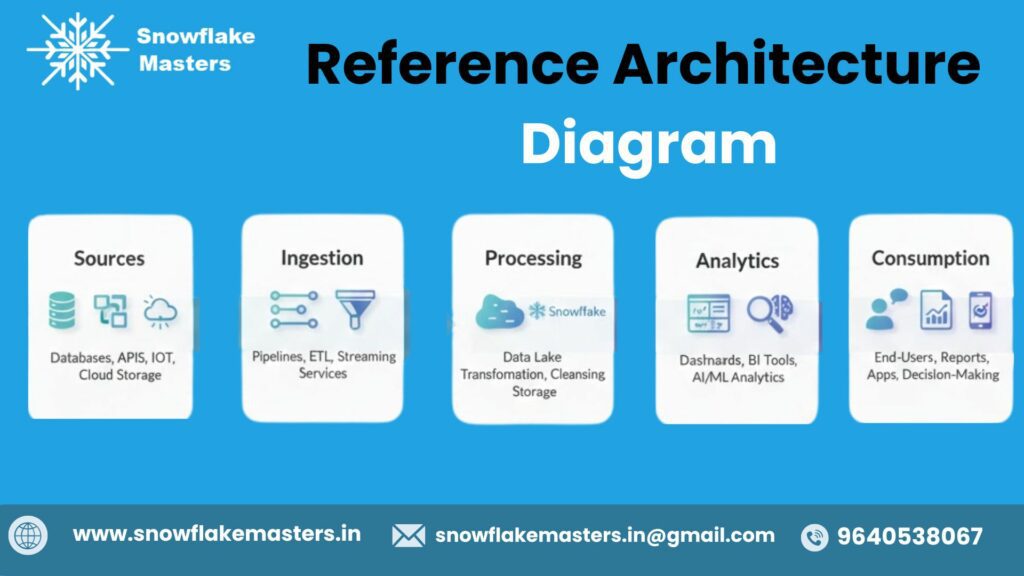
Reference Architecture Diagram Snowflake Continuous Data Pipeline Flow:
Sources → Ingestion → Processing → Analytics → Consumption
- Sources: Applications, SaaS platforms, databases, IoT, event streams
- Ingestion: Snowpipe, Snowpipe Streaming
- Processing: Streams, Tasks, Dynamic Tables
- Analytics: Curated tables, feature stores, semantic layers
- Consumption: BI tools, AI/ML models, data sharing, native apps
Key Components Explained (2026-Optimized)
Snowflake continuous data pipelines are built using native, serverless components designed for scalability, low latency, and AI-ready analytics. Below is a clear, practical breakdown of each core component and how it fits into modern 2026-era data architectures.
Snowpipe vs Snowpipe Streaming
Both Snowpipe and Snowpipe Streaming enable continuous ingestion, but they serve different latency and architecture needs.
Snowpipe (Micro-Batch Ingestion)
Snowpipe automatically loads data from cloud storage (AWS S3, Azure Blob, GCS) as soon as new files arrive.
- Best for: Event files, logs, IoT batches, SaaS exports
- Latency: Seconds to a few minutes
- Fully serverless and auto-scaling
- Cost based on data processed
Snowpipe Streaming (True Streaming Ingestion)
Snowpipe Streaming enables row-level, low-latency ingestion directly into Snowflake tables via SDKs.
- Best for: Application events, real-time telemetry, user activity data
- Latency: Sub-second to seconds
- No file staging required
- Ideal for real-time analytics and AI pipelines
2026 Insight:
Enterprises increasingly use Snowpipe for file-based ingestion and Snowpipe Streaming for application and AI workloads, often together in hybrid pipelines.
Streams for Incremental Data Processing
Snowflake Streams track row-level changes (CDC) in tables, enabling incremental processing without re-reading full datasets.
Key capabilities:
- Captures inserts, updates, and deletes
- Eliminates expensive full-table scans
- Enables event-driven transformations
- Works seamlessly with Tasks and Dynamic Tables
Why Streams Matter in 2026:
With data volumes growing exponentially, incremental processing is no longer optional. Streams are foundational for cost-efficient, scalable continuous pipelines in Snowflake.
Tasks vs Serverless Scheduling
Snowflake Tasks automate SQL-based processing, but their serverless evolution makes them even more powerful in continuous pipelines.
Traditional Tasks
- Schedule-based (cron or interval)
- Requires warehouse management
- Good for predictable batch workflows
Serverless Tasks
- Fully managed compute
- Auto-scale based on workload
- Lower operational overhead
- Ideal for event-driven and continuous workloads
Best Practice:
In modern architectures, serverless Tasks paired with Streams or Dynamic Tables replace external schedulers like Airflow for most Snowflake-native use cases.
Dynamic Tables vs Materialized Views
Dynamic Tables represent a major shift in how transformations are built in Snowflake.
Materialized Views
- Precompute query results
- Limited transformation logic
- Manual refresh complexity
- Best for performance optimization only
Dynamic Tables
- Declarative transformation logic
- Automatically maintained freshness
- Supports complex joins and business logic
- Designed for continuous data pipelines
2026 Recommendation:
Use Dynamic Tables for pipeline transformations and Materialized Views strictly for query performance tuning—not pipeline logic.
Cortex & AI Integration (Where Pipelines Feed AI)
Continuous data pipelines are now AI pipelines, and Snowflake Cortex sits at the center of this evolution.
How pipelines feed Snowflake AI:
- Real-time features for ML models
- Fresh embeddings for search and recommendation systems
- Continuous data for LLM-powered analytics
- Governed, secure AI-ready datasets
Why This Matters:
AI accuracy depends on data freshness. Snowflake continuous pipelines ensure Cortex and AI workloads always operate on current, trusted data—without separate ML infrastructure.
Step-by-Step: How to Build a Continuous Data Pipeline in Snowflake
This step-by-step framework reflects 2026 best practices for building scalable, cost-efficient, and near–real-time data pipelines using Snowflake-native capabilities. It avoids unnecessary tooling while ensuring production-grade reliability.
Step 1 – Source System & Data Modeling
Start by identifying data sources and designing a Snowflake-optimized data model.
Common source systems
- SaaS applications (Salesforce, HubSpot, Zendesk)
- Operational databases (PostgreSQL, MySQL, SQL Server)
- Event streams and application logs
- Cloud storage (AWS S3, Azure Blob, GCS)
Best practices
- Classify sources as append-only, mutable, or event-based
- Design for incremental ingestion, not full reloads
- Use separate raw, staging, and analytics schemas
- Apply Snowflake-friendly modeling (wide tables, semi-structured support)
Why it matters:
Good source modeling reduces downstream reprocessing, compute usage, and pipeline failures.
Step 2 – Real-Time Ingestion Setup
Snowflake supports continuous ingestion without external streaming infrastructure.
Snowflake-native ingestion options
- Snowpipe – Auto-ingests micro-batches from cloud storage
- Snowpipe Streaming – Low-latency ingestion from applications and event producers
- Partner connectors – Fivetran, Matillion, Informatica (Snowflake-optimized)
Best practices
- Choose Snowpipe Streaming for sub-minute latency
- Use event notifications instead of polling
- Partition data logically for downstream transformations
- Secure ingestion with roles, network policies, and encryption
Why it matters:
Native ingestion reduces operational overhead and ensures elastic scalability.
Step 3 – Change Data Capture (CDC)
Continuous pipelines must efficiently track what changed—not reprocess everything.
Snowflake CDC approaches
- Streams on tables or views for insert/update/delete tracking
- Source-level CDC tools writing changes to Snowflake
- Timestamp- and sequence-based incremental logic
Best practices
- Use Streams for Snowflake-to-Snowflake CDC
- Avoid full-table merges in high-volume pipelines
- Handle late-arriving and out-of-order data explicitly
- Design idempotent transformations
Why it matters:
CDC is critical for keeping analytics and AI features continuously updated without excessive compute costs.
Step 4 – Transformations with Dynamic Tables
Dynamic Tables are the core of modern Snowflake continuous transformations.
Why Dynamic Tables
- Automatically refresh based on upstream changes
- Declarative transformation logic
- Built-in dependency management
- Reduced orchestration complexity
Best practices
- Define clear target lag based on business needs
- Layer transformations (bronze → silver → gold)
- Use clustering and pruning-friendly filters
- Avoid over-refreshing low-value datasets
Why it matters:
Dynamic Tables replace brittle task chains and enable reliable, self-healing pipelines.
Step 5 – Orchestration & Automation
Snowflake minimizes the need for external orchestration tools.
Snowflake-native orchestration
- Tasks for lightweight scheduling and triggers
- Streams + Tasks for event-driven processing
- Dynamic Table dependency graphs
Best practices
- Prefer event-driven automation over fixed schedules
- Keep orchestration logic inside Snowflake when possible
- Use external tools only for cross-platform workflows
- Version-control SQL and pipeline definitions
Why it matters:
Simpler orchestration improves reliability, observability, and maintainability.
Step 6 – Monitoring, Cost Control & Optimization
Continuous pipelines must be observable and cost-efficient.
Key monitoring areas
- Data freshness and pipeline lag
- Failed loads and transformation errors
- Compute usage by warehouse
- Snowpipe and Dynamic Table refresh metrics
Cost optimization strategies
- Right-size warehouses and use auto-suspend
- Set appropriate refresh lags for Dynamic Tables
- Monitor unused or over-refreshing pipelines
- Separate ingestion, transformation, and analytics workloads
Why it matters:
Without active monitoring and optimization, continuous pipelines can quietly become expensive and unreliable.
Tools & Resources for Snowflake Continuous Data Pipelines
Modern Snowflake pipelines are built using a combination of native Snowflake capabilities and select ecosystem tools, with strong emphasis on monitoring, cost control, and governance. Choosing the right mix depends on data volume, latency needs, team skills, and enterprise compliance requirements.
Native Snowflake Tools
Snowflake provides several built-in, serverless tools designed specifically for continuous data ingestion and transformation—eliminating much of the operational overhead found in traditional architectures.
Snowpipe
Snowpipe enables continuous, event-driven data ingestion from cloud storage (AWS S3, Azure Blob, GCS) into Snowflake tables. It automatically loads new files as they arrive, providing near–real-time ingestion without managing infrastructure.
Streams
Streams track incremental data changes (inserts, updates, deletes) at the table level. They allow pipelines to process only new or changed data, which is critical for efficient continuous transformations and downstream analytics.
Tasks
Tasks automate SQL execution on schedules or in response to data changes. When combined with Streams, Tasks enable fully automated, incremental transformation pipelines directly inside Snowflake.
Dynamic Tables (2026-Ready Standard)
Dynamic Tables define continuously updated results based on upstream data changes and freshness targets. They replace complex task orchestration with declarative logic, making pipelines simpler, more reliable, and easier to maintain at scale.
Partner & Ecosystem Tools
While Snowflake-native tools cover most pipeline needs, many enterprises integrate ecosystem tools for advanced ingestion, orchestration, or transformation workflows.
Apache Kafka
Kafka is used for high-throughput, low-latency streaming data from event-driven systems. With Snowpipe Streaming, Kafka data can be ingested into Snowflake with near–real-time guarantees.
Fivetran
Fivetran offers managed, automated ingestion from SaaS applications and databases. It reduces engineering effort for common sources while integrating cleanly with Snowflake continuous pipelines.
Matillion
Matillion provides a visual, ELT-focused interface for building Snowflake-native transformations. It is often used by teams transitioning from legacy ETL tools.
dbt (Data Build Tool)
dbt is widely used for modular, version-controlled transformations in Snowflake. When combined with Streams, Tasks, or Dynamic Tables, dbt supports scalable, analytics-engineering–driven pipeline development.
Apache Airflow
Airflow remains useful for cross-system orchestration and dependency management, especially in hybrid or multi-cloud architectures, even though many Snowflake-only pipelines now rely less on external schedulers.
Monitoring & Governance
Continuous pipelines require strong cost visibility, security controls, and data reliability monitoring—especially in enterprise environments.
Resource Monitors
Resource Monitors track Snowflake credit usage and enforce spending limits. They are essential for controlling costs in always-on, continuous pipeline workloads.
Access Control
Role-Based Access Control (RBAC), secure views, and row-level security ensure that pipeline data is governed and compliant. Proper access design prevents data leaks while supporting self-service analytics.
Data Observability Tools
Third-party observability platforms monitor freshness, volume anomalies, schema changes, and pipeline failures. These tools help teams detect issues early and maintain trust in real-time analytics.

Snowflake Continuous Pipelines vs Alternatives
Choosing the right data pipeline architecture depends on latency needs, scale, team skills, and total cost of ownership. Below is a practical, 2026-ready comparison of Snowflake Continuous Data Pipelines versus the most common alternatives used by modern data teams.
Snowflake vs Traditional ETL Tools
Traditional ETL tools (Informatica, Talend, SSIS, legacy Airflow-based workflows) were built for batch-first data processing.
Key differences:
- Latency:
Traditional ETL runs on schedules (hourly/daily), while Snowflake pipelines process data continuously using Snowpipe, Streams, Tasks, and Dynamic Tables. - Infrastructure management:
ETL tools require servers, connectors, and orchestration layers. Snowflake pipelines are fully managed and serverless. - Cost model:
ETL tools often combine licensing, compute, and maintenance costs. Snowflake charges only for usage-based compute and storage. - Scalability:
Snowflake scales automatically with data volume; traditional ETL pipelines often need manual tuning.
Best fit:
Snowflake continuous pipelines are ideal for cloud-native teams replacing legacy batch ETL with simpler, real-time architectures.
Snowflake vs Databricks Streaming
Databricks Streaming (Spark Structured Streaming) is powerful but optimized for different use cases.
Key differences:
- Operational complexity:
Databricks requires cluster sizing, job tuning, and streaming state management. Snowflake pipelines are SQL-driven and fully managed. - Skill requirements:
Databricks favors Spark, Scala, or Python expertise. Snowflake pipelines primarily use SQL, making them accessible to BI and analytics teams. - Latency model:
Databricks excels at low-latency, event-level processing. Snowflake focuses on near–real-time analytics and data availability. - Analytics integration:
Snowflake pipelines feed analytics, BI, and AI workloads directly without moving data between platforms.
Best fit:
Use Snowflake when analytics, reporting, and AI-ready data are the primary goals. Use Databricks when complex stream processing or ML pipelines dominate.
Snowflake vs Kafka-Centric Architectures
Kafka-based architectures (Kafka, Confluent, Flink) are common for event-driven systems but add architectural overhead.
Key differences:
- Architecture complexity:
Kafka requires brokers, topics, consumers, schema management, and monitoring. Snowflake pipelines abstract most of this complexity. - Cost and operations:
Kafka clusters can be expensive and operationally heavy at scale. Snowflake provides elastic, pay-per-use processing. - Use case focus:
Kafka is ideal for microservices and event routing. Snowflake is optimized for analytics, reporting, and data science. - Time-to-value:
Snowflake pipelines can be deployed faster using SQL and native features.
Best fit:
Choose Snowflake for analytics-first pipelines. Kafka makes sense when event-driven application workflows require millisecond-level processing.
When NOT to Use Continuous Pipelines
Snowflake continuous pipelines are not the best solution in every scenario.
Avoid or reconsider when:
- Ultra-low latency is required (sub-second or millisecond processing)
- Complex event processing or stream joins are core requirements
- Heavy real-time transformations are better handled in application code
- Data arrives infrequently and batch processing is more cost-effective
- Strict event-driven microservices orchestration is the primary goal
In these cases, Kafka, Flink, or Spark Streaming may complement—or precede—Snowflake rather than replace it.
Real-World Use Cases (Enterprise & Career-Focused)
Snowflake continuous data pipelines are not theoretical concepts—they power mission-critical analytics, AI, and decision systems across industries. Below are high-impact, real-world use cases that matter both for enterprise adoption and for career-ready Snowflake skills in 2026 and beyond
Real-Time BI Dashboards
Enterprises increasingly demand dashboards that reflect live business performance, not yesterday’s data. With Snowflake continuous pipelines, data flows from source systems to analytics layers in near real time.
How Snowflake enables this
- Snowpipe or Snowpipe Streaming ingests data continuously
- Streams capture incremental changes
- Dynamic Tables refresh automatically based on data freshness SLAs
Business impact
- Up-to-the-minute sales, revenue, and operational metrics
- Faster executive decision-making
- Reduced dependency on batch refresh windows
Career relevance
Real-time BI is one of the most in-demand Snowflake skills for BI developers and analytics engineers, especially for roles focused on executive reporting and operational analytics.
Fraud Detection & Risk Analytics
Fraud and risk systems lose effectiveness when data arrives late. Continuous data pipelines in Snowflake allow organizations to detect anomalies and threats as they happen.
How Snowflake enables this
- Streaming transaction data ingested continuously
- Change tracking with Streams for incremental analysis
- Tasks trigger automated risk scoring or alerts
Business impact
- Faster fraud detection and response
- Reduced financial losses
- Improved regulatory compliance
Career relevance
Data engineers with experience in low-latency Snowflake pipelines are highly valued in fintech, banking, and insurance domains.
IoT & Event Streaming Analytics
IoT devices and event-driven applications generate massive volumes of high-velocity data. Snowflake continuous pipelines handle this scale without manual infrastructure management.
How Snowflake enables this
- Snowpipe Streaming for high-throughput event ingestion
- Auto-scaling compute for bursty workloads
- Native support for semi-structured data (JSON, Avro, Parquet)
Business impact
- Real-time monitoring of devices, sensors, and applications
- Predictive maintenance and operational insights
- Simplified IoT analytics architecture
Career relevance
Cloud and data engineers skilled in event-driven Snowflake architectures are increasingly in demand across manufacturing, telecom, and smart infrastructure sectors.
Customer 360 & Personalization
Personalized experiences require continuously updated customer data across multiple touchpoints. Batch pipelines often fail to deliver a true, unified view.
How Snowflake enables this
- Continuous ingestion from CRM, web, and marketing platforms
- Streams track customer-level changes
- Dynamic Tables maintain up-to-date customer profiles
Business impact
- Real-time segmentation and personalization
- Improved customer engagement and retention
- Better alignment between marketing, sales, and support teams
Career relevance
Analytics professionals and data modelers with Customer 360 Snowflake experience are critical to modern digital and data-driven organizations.
AI/ML Feature Pipelines
AI and machine learning models depend on fresh, reliable features. Stale data leads to poor predictions and degraded model performance.
How Snowflake enables this
- Continuous feature ingestion and transformation
- Automated feature refresh using Dynamic Tables
- Direct integration with Snowflake ML and external ML platforms
Business impact
- More accurate predictions and recommendations
- Faster model iteration and deployment
- Reduced feature engineering complexity
Career relevance
Snowflake engineers who understand AI-ready data pipelines gain a competitive edge as enterprises expand AI and generative AI initiatives.
Conclusion : Snowflake Continuous Data Pipelines
Snowflake continuous data pipelines are future-proof by design. They eliminate batch latency, reduce architectural complexity, and scale automatically as data volumes, real-time analytics, and AI workloads grow. By using Snowflake-native services—Snowpipe, Dynamic Tables, Streams, and Tasks—organizations gain faster insights, lower costs, and a unified platform ready for modern data, BI, and AI use cases in 2026 and beyond.
Frequently Asked Questions
1.What is a continuous data pipeline in Snowflake?
A continuous data pipeline in Snowflake is a cloud-native architecture that ingests, processes, and updates data incrementally and automatically using Snowflake-native services like Snowpipe, Snowpipe Streaming, Streams, Tasks, and Dynamic Tables. It eliminates batch delays and supports near real-time analytics and AI workloads.
2.Is Snowflake real-time or near real-time?
Snowflake supports near real-time data processing, not hard real-time. Data can be ingested and transformed within seconds to minutes, which is sufficient for analytics, dashboards, operational reporting, and AI feature pipelines.
3.How does Snowpipe work internally?
Snowpipe uses event-driven, serverless ingestion. When new files land in cloud storage (AWS S3, Azure Blob, GCS), Snowflake automatically detects them, loads only new data, and scales compute elastically—without requiring running warehouses 24/7.
4.What is the difference between Streams and Tasks?
- Streams track data changes (inserts, updates, deletes) at the table level using CDC metadata.
- Tasks schedule and automate SQL execution, often triggered by Streams.
Together, they enable incremental transformations instead of full table rebuilds.
5.Are Dynamic Tables better than views?
Dynamic Tables are better for continuous transformations because they:
- Automatically refresh based on dependencies
- Store results physically for faster queries
- Support incremental processing
Views are better for lightweight, on-the-fly queries but don’t handle pipeline automation.
6. Can Snowflake replace Kafka?
Snowflake can reduce or eliminate Kafka for many analytics use cases using Snowpipe Streaming. However, Kafka is still better for event-driven microservices and ultra-low-latency streaming, while Snowflake excels at analytics, BI, and AI pipelines.
7. How much do continuous pipelines cost in Snowflake?
Costs depend on:
- Data ingestion volume
- Compute usage for transformations
- Storage and cloud provider
Snowflake continuous pipelines are often cheaper than batch ETL + streaming stacks because they avoid always-on infrastructure and over-provisioning.
8. Is Snowflake good for streaming analytics?
Yes. Snowflake supports streaming analytics through Snowpipe Streaming combined with Dynamic Tables and Streams & Tasks. It is widely used for real-time dashboards, monitoring, and near real-time insights.
9.What skills are needed to build Snowflake pipelines?
Key skills include:
- SQL (core requirement)
- Snowflake architecture concepts
- Streams, Tasks, Dynamic Tables
- Cloud storage basics (S3, Blob, GCS)
- Data modeling and performance optimization
No heavy Java or Scala skills are required.
10. Can beginners learn Snowflake pipelines easily?
Yes. Snowflake pipelines are beginner-friendly because they rely on SQL and managed services. Students and job-seekers can build production-grade pipelines without deep infrastructure or streaming system knowledge.
11. How does Snowflake handle CDC (Change Data Capture)?
Snowflake handles CDC using:
- Streams for table-level changes
- Native CDC connectors (e.g., Snowflake Connector for Kafka, Fivetran, Debezium)
This enables efficient incremental updates without full reloads.