

Column-Level Security in Snowflake
Column-Level Security in Snowflake is a data protection feature that controls access to specific columns within a table using masking policies. It ensures sensitive data—such as PII, financial values, or confidential business fields—is automatically hidden or partially masked based on a user’s role, without changing queries or creating multiple tables. This allows organizations to securely share data while meeting compliance requirements like GDPR, HIPAA, and SOC 2.
Introduction: Column-Level Security in Snowflake
Why Column-Level Security Matters in Modern Data Platforms
In today’s data-driven world, organizations store massive volumes of sensitive information—customer names, email IDs, salaries, health records, financial data, and more—inside cloud data platforms like Snowflake. While this data is extremely valuable for analytics and decision-making, it also comes with serious security and compliance responsibilities.
This is where Column-Level Security in Snowflake becomes critical.
Column-Level Security in Snowflake ensures that users can only see the data they are authorized to view, even when they have access to the same table. Instead of locking down entire tables, Snowflake allows you to protect specific columns that contain sensitive information—without duplicating data or creating complex access rules.
Data Access Explosion Through Self-Service Analytics
Modern analytics teams thrive on self-service access. Business users, analysts, data scientists, and AI tools all need direct access to Snowflake data to move fast. But this freedom comes with a risk: too many users accessing too much data. Without column-level security, sensitive fields are exposed the moment access is granted to a table—turning speed into a security liability.
PII Exposure Risk in Shared Snowflake Environments
Snowflake is designed for data sharing at scale—across teams, departments, partners, and even customers. In shared environments, columns containing PII, PHI, salaries, credit card data, or internal metrics often sit alongside non-sensitive data. Without column-level protection, a single role misconfiguration can expose regulated data, leading to breaches, fines, and loss of trust.
Compliance Pressure Across Regulated Industries
Industries like finance, healthcare, SaaS, e-commerce, and government face strict compliance mandates (GDPR, HIPAA, PCI-DSS, SOC 2). These regulations require least-privilege access and data minimization. Table-level permissions are no longer enough—auditors now expect column-level enforcement with clear access logic and auditability.
Why Legacy Column Security Approaches Fail at Scale
Traditional solutions rely on:
- Duplicate tables or views
- Application-side filtering
- Manual data obfuscation
These approaches don’t scale. They increase maintenance overhead, break governance, create data drift, and slow analytics. As data volumes and users grow, legacy methods become fragile, error-prone, and expensive to manage.
Why Snowflake-Native Security Is Now the Enterprise Standard
Snowflake solves this natively using masking policies, role-based access control (RBAC), and centralized governance. Security is enforced at query runtime, automatically adapting to the user’s role—without changing SQL, pipelines, or downstream tools. This makes Snowflake column-level security scalable, auditable, and enterprise-ready.
Search Intent Mapping (Built for Conversion)
Learn: What Column-Level Security Is and How It Works
For beginners and decision-makers, this content explains what column-level security means in Snowflake, why it exists, and how masking policies dynamically protect data—clearly and simply.
Evaluate: Best Practices and Architectural Decisions
For architects and leads, we cover design patterns, role strategies, performance considerations, and governance trade-offs—helping teams choose the right implementation model.
Implement: Step-by-Step Snowflake-Native Approach
For hands-on engineers, we walk through practical, production-ready implementation using Snowflake features—without hacks, workarounds, or unnecessary tools.
Buy: Snowflake Security Consulting and Implementation
For enterprises, this content supports vendor evaluation and buying decisions, showing how expert-led Snowflake security implementation reduces risk, speeds compliance, and Column-Level Security in Snowflake scales safely.
Skill Up: Career-Ready Knowledge for Data Professionals
For students and professionals, mastering column-level security is now a must-have Snowflake skill. This knowledge directly improves job readiness, interview performance, and real-world impact.
Architecture of Column-Level Security in Snowflake
Snowflake’s column-level security architecture is policy-driven, role-aware, and enforced at query runtime. Instead of duplicating tables or modifying SQL logic, Snowflake applies security controls automatically and transparently, making it scalable for enterprise data platforms.
At a high level, masking policies sit between the user and the data, deciding—at query time—what value should be returned for each column based on the user’s active role.
Masking Policies as the Enforcement Layer
Masking policies are the core enforcement mechanism behind column-level security in Snowflake. Once attached to a column, the policy is always evaluated—no matter how the data is queried (SELECT, JOIN, VIEW, or BI tool access).
Dynamic Masking Fundamentals
Dynamic masking means:
- The same column can return different values to different users
- Decisions are made at query execution time
- No data is permanently altered or duplicated
For example:
- Authorized roles see the full value
- Semi-authorized roles see partially masked data
- Unauthorized roles see NULL or obfuscated values
This approach allows teams to:
- Secure sensitive data without changing application queries
- Support analytics, reporting, and ML workloads safely
- Enforce compliance policies consistently across the platform
Role-Aware Logic Design
Masking policies use role-based logic to determine visibility. Snowflake evaluates:
- The current active role
- Role inheritance (parent/child roles)
- Conditional logic defined in the policy
Typical role-aware conditions include:
- Executive vs analyst access
- Internal employees vs external partners
- Regional or department-level restrictions
Because policies are centralized:
- Security logic is defined once
- Changes apply instantly across all downstream queries
- Data governance teams maintain full control and auditability
Role Hierarchies and Authorization Flow
Snowflake’s role-based access control (RBAC) system plays a critical role in how column-level security decisions are resolved.
How Access Decisions Are Resolved
When a query runs, Snowflake follows this authorization flow:
- Identifies the active role of the user
- Evaluates role hierarchy and inherited privileges
- Executes the masking policy logic
- Returns the appropriate masked or unmasked value
Key points:
- Higher-level roles automatically inherit access from lower-level roles
- Masking policies respect role inheritance
- Users never bypass masking—even with direct table access
This ensures:
- Predictable and explainable security behavior
- No accidental data exposure
- Strong alignment with zero-trust security principles
Runtime Enforcement & Performance Behavior
One of Snowflake’s biggest advantages is that security does not come at the cost of performance.
Why Masking Does Not Materially Impact Query Speed
Masking policies are:
- Evaluated at runtime
- Optimized within Snowflake’s query execution engine
- Applied after pruning and optimization, not before
As a result:
- No additional storage or compute overhead
- No query rewrites or joins
- No performance penalties for large datasets
Snowflake’s architecture ensures that masking:
- Scales with billions of rows
- Works seamlessly with caching and clustering
- Remains invisible to end users and BI tools
Bottom Line:
Column-level security in Snowflake is secure by design and fast by default.

End-to-End Implementation Framework
This framework provides a practical, enterprise-ready approach to implementing Column-Level Security in Snowflake—from identifying sensitive data to ongoing governance. Each phase is designed to be scalable, auditable, and compliance-friendly, while remaining simple enough for teams new to Snowflake security.
Phase 1 – Data Classification & Risk Identification
Identifying sensitive and regulated columns
The first step is understanding what data needs protection and why. Not all columns require security controls, so classification prevents over-masking and performance issues.
What to identify:
- Personally Identifiable Information (PII): names, emails, phone numbers, Aadhaar/SSN
- Financial data: salaries, transaction amounts, credit details
- Sensitive business data: pricing, margins, internal KPIs
- Regulated fields: data governed by GDPR, HIPAA, PCI-DSS, or local data laws
Best practices:
- Tag sensitive columns using Snowflake tags for easier governance
- Assign risk levels (High / Medium / Low) to each column
- Involve legal, security, and data owners early to avoid compliance gaps
Why this matters:
Clear classification ensures security is applied only where needed, reducing complexity and improving trust in analytics.
Phase 2 – Access Model & Role Design
Least-privilege strategy for Snowflake
Once sensitive columns are identified, design a role-based access model that follows the principle of least privilege—users only see what they truly need.
Recommended role layers:
- Admin roles: Full access (security, platform teams)
- Engineer roles: Masked access for development and testing
- Analyst roles: Partial or obfuscated data
- Executive / Compliance roles: Full or conditional visibility
Key design rules:
- Avoid granting access directly to users—assign roles instead
- Separate data access roles from compute and admin roles
- Plan for future growth (new teams, tools, and data shares)
Why this matters:
A clean role model makes column-level security predictable, scalable, and audit-friendly.
Phase 3 – Policy Creation & Reuse Strategy
Designing scalable masking logic
Masking policies are the core of column-level security. The goal is to create reusable policies, not one-off rules for each table.
Effective masking policy design:
- Use role-based conditions (e.g., CURRENT_ROLE())
- Apply dynamic masking instead of static redaction
- Standardize policies for common data types:
- Email masking
- Numeric range masking
- Full redaction for high-risk fields
Best practices:
- Create centralized policy libraries
- Reuse policies across multiple tables and schemas
- Document policy logic for auditors and new team members
Why this matters:
Reusable policies reduce maintenance effort and ensure consistent security behavior across the data platform.
Phase 4 – Applying Security Controls
Tables, views, shared datasets, and future objects
After defining policies, apply them across all relevant data access points.
Where to apply column-level security:
- Base tables: Primary enforcement layer
- Views: Additional abstraction for analytics teams
- Data shares: Secure sharing with partners or business units
- Future tables: Automatically enforce policies on new objects
Implementation tips:
- Apply masking at the table level, not just views
- Use future grants to prevent security gaps
- Validate policies on shared data before external access
Why this matters:
Security must be enforced everywhere data is consumed, not just in one layer.
Phase 5 – Validation & Analytics Tool Testing
Ensuring BI and reporting tools respect masking
Column-level security is only effective if downstream tools honor it.
What to test:
- Dashboards in Power BI, Tableau, Looker, Excel
- Direct SQL access via different roles
- Cached results and extract-based reports
Validation checklist:
- Same query, different roles → different results
- Masked values never exposed via filters or exports
- No performance degradation in BI workloads
Why this matters:
Testing prevents accidental data leaks and ensures business users trust masked analytics.
Phase 6 – Auditing, Monitoring & Governance
Ongoing access review and compliance readiness
Security is not a one-time setup. Continuous monitoring ensures long-term compliance.
Governance activities:
- Review role assignments regularly
- Monitor policy usage and access patterns
- Maintain audit logs for compliance reviews
- Align with internal and external audit requirements
Advanced practices:
- Integrate with Snowflake Access History
- Automate compliance reporting
- Periodically reassess data classification as schemas evolve
Why this matters:
Strong governance keeps your Snowflake environment secure, compliant, and audit-ready at all times.
Enterprise Best Practices (Beyond Basic Masking)
Column-level security in Snowflake goes far beyond simply hiding sensitive values. At the enterprise scale, the real challenge is governance, consistency, performance, and future-proofing—especially when data is shared across teams, accounts, and AI systems. The best practices below help organizations move from basic masking to enterprise-grade data protection.
Preventing Policy Sprawl
As organizations grow, unmanaged masking policies can quickly spiral into chaos—creating hundreds of overlapping, redundant, or conflicting policies.
Best practices to prevent policy sprawl:
- Create reusable, role-based masking policies instead of one-off policies per column.
- Centralize policies by data domain (PII, Financial, Healthcare, Internal).
- Avoid embedding business logic inside policies; keep them simple and predictable.
- Regularly audit unused or deprecated policies using Snowflake’s account usage views.
Why this matters:
Clean policy design reduces security risk, lowers maintenance costs, and ensures faster audits—critical for global enterprises operating under multiple regulations.
Standardizing Naming & Ownership
Inconsistent naming and unclear ownership lead to confusion, misconfigurations, and audit failures.
Enterprise-standard approach:
- Use clear naming conventions such as: MP_PII_EMAIL, MP_FIN_SALARY, MP_INTERNAL_CONFIDENTIAL
- Assign explicit ownership to a data security or platform team—not individual developers.
- Document each policy’s purpose, scope, and approved roles.
- Enforce policy creation through infrastructure-as-code (IaC) or controlled workflows.
Why this matters:
Standardization improves cross-team collaboration, speeds up onboarding, and makes Snowflake security understandable even for non-experts.
Combining Column & Row-Level Controls
Column-level security alone is not enough for enterprise-grade access control. The strongest architectures combine masking policies (columns) with row access policies (rows).
How enterprises do it right:
- Use row access policies to control which records a user can see.
- Use masking policies to control what values within those records are visible.
- Apply both policies directly at the table level for consistent enforcement.
- Test combined policies to avoid performance bottlenecks.
Example scenario:
A regional manager can see only their region’s rows—and even within those rows, salary columns remain masked.
Why this matters:
This layered approach aligns with Zero Trust data architecture, now a global security standard.
Securing Data for AI, ML & LLM Workloads
AI models are only as safe as the data they consume. Without proper controls, sensitive data can easily leak into training pipelines or LLM prompts.
Best practices for AI-ready security:
- Apply masking policies to feature tables and training datasets.
- Use secure roles for AI pipelines with least-privilege access.
- Mask PII before exposing data to Snowflake Cortex, notebooks, or external ML tools.
- Create separate roles for model training vs. model inference.
Why this matters (AI + Compliance):
Regulators increasingly scrutinize how AI systems access personal and confidential data. Snowflake masking policies help enforce ethical and compliant AI by design.
Multi-Account & Data Sharing Considerations
Snowflake’s data sharing and multi-account architectures add complexity to column-level security.
Enterprise-safe approach:
- Understand that masking policies apply in the provider account, not the consumer account.
- Validate how policies behave when data is shared with partners or business units.
- Use secure views combined with masking policies for controlled external sharing.
- Test all shared datasets using consumer roles before production rollout.
Why this matters:
Global enterprises sharing data across regions, subsidiaries, or partners must ensure consistent security enforcement—regardless of where the data is accessed.
Evaluating Alternatives & Design Choices
Choosing the right security approach in Snowflake is not just a technical decision—it impacts performance, governance, scalability, and long-term cost. Below is a clear, practical comparison to help data teams, architects, and security leaders make informed choices.
Column-Level Security vs Secure Views
Column-Level Security (Masking Policies) controls data visibility at the column level, while Secure Views control access by reshaping the data.
Key Differences:
- Column-Level Security
- Applies masking automatically based on user role
- Works across all queries (BI tools, SQL, APIs)
- No need to rewrite or maintain multiple views
- Better for large-scale, enterprise environments
- Secure Views
- Requires creating and maintaining separate views
- Logic must be updated whenever schemas change
- Can become hard to manage as tables grow
- Useful for quick, small-scale access control
Design Guidance:
If your goal is scalable, low-maintenance security, column-level security is the better long-term choice. Secure views are best for temporary or lightweight use cases.
Column-Level Security vs Row-Level Security
While both are essential, they solve different security problems.
- Column-Level Security
- Protects what data a user can see
- Ideal for PII, financial data, or confidential attributes
- Uses masking instead of filtering
- Row-Level Security
- Controls which records a user can access
- Common for multi-tenant or regional data isolation
- Implemented using row access policies
Best Practice:
Most real-world Snowflake architectures use both together—row-level security to limit datasets and column-level security to protect sensitive fields.
Native Snowflake Security vs External Tools
Snowflake provides powerful native security controls, but some organizations still consider external tools.
Native Snowflake Security
- Built-in masking and row access policies
- No data movement or latency
- Fully integrated with Snowflake RBAC
- Lower operational complexity and cost
External Security Tools
- Add extra infrastructure and licensing costs
- Often require data duplication or proxy layers
- Useful for cross-platform governance or legacy systems
Decision Insight:
If your data lives primarily in Snowflake, native security is faster, simpler, and more cost-effective. External tools make sense only when managing multi-platform ecosystems.
Build vs Buy Decision Framework
When deciding whether to build security controls internally or buy external solutions, evaluate these factors:
Build (Snowflake-Native) if:
- Your data stack is Snowflake-centric
- You want minimal latency and high performance
- Your team understands Snowflake RBAC and policies
- Compliance requirements are standard (GDPR, HIPAA, SOC 2)
Buy (External Tools) if:
- You operate across multiple data platforms
- Centralized governance is mandatory
- You need advanced data discovery or classification
Regulatory needs exceed Snowflake’s native scope
Industry-Specific Use Cases
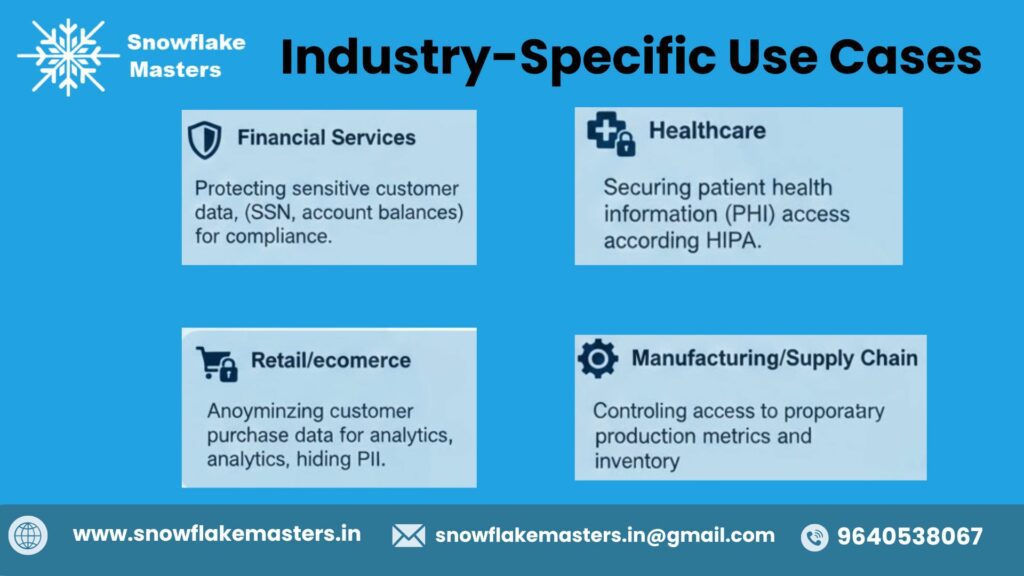
Column-Level Security in Snowflake is not just a generic data protection feature—it’s highly applicable across industries, enabling organizations to enforce fine-grained access controls while maintaining data usability. Below are some real-world industry-specific use cases highlighting how Snowflake’s column-level security safeguards sensitive information and ensures compliance.
Healthcare & Life Sciences
In healthcare and life sciences, protecting patient data is mandatory under HIPAA, GDPR, and local health regulations. Column-level security allows:
- Masking sensitive patient information like SSNs, medical history, and lab results for non-clinical teams.
- Controlled researcher access to de-identified datasets for analytics or AI modeling.
- Secure collaboration across hospitals, labs, and research institutions without creating duplicate datasets.
Banking, FinTech & Insurance
Financial institutions deal with highly sensitive customer information such as account numbers, transaction histories, credit scores, and KYC documents. Column-level security enables:
- Masked financial data for customer service reps while full access is reserved for compliance officers.
- Regulatory compliance with GDPR, PCI DSS, and local financial regulations.
- Multi-tiered access for risk analysis, fraud detection, and portfolio management.
SaaS & Multi-Tenant Platforms
SaaS companies serving multiple clients need data isolation without duplicating tables. Column-level security provides:
- Tenant-specific masking so one customer never sees another’s sensitive data.
- Dynamic access policies that adapt to subscription tiers or feature levels.
- Simplified multi-tenant analytics for product and support teams.
Enterprise BI & Self-Service Analytics
Modern enterprises allow business users to run queries on large datasets. Column-level security ensures:
- Sensitive data stays masked for self-service analysts.
- Governed access prevents accidental exposure of PII or confidential financials.
- Seamless integration with BI tools like Tableau, Power BI, and Looker.
AI-Driven Analytics & Data Products
AI and ML models require access to large volumes of data, but not all data should be exposed. Column-level security helps:
- Protect training data by masking sensitive fields while still allowing model learning.
- Create governed data products that respect compliance and privacy laws.
- Enable advanced analytics like predictive modeling without exposing critical data.
Advantages and Trade-Offs
Column-Level Security in Snowflake provides strong protection for sensitive data, but like any security feature, it comes with both benefits and considerations. Understanding these helps data teams implement it effectively without overcomplicating operations.
Key Benefits
- Native Enforcement
Snowflake applies column-level security directly within the platform using masking policies, eliminating the need for external tools or manual enforcement. This ensures that sensitive data is always protected at query time, reducing the risk of accidental exposure. - No Data Duplication
Unlike approaches that require creating multiple table copies or views for restricted data, Snowflake lets you control access without duplicating data, simplifying management and reducing storage costs. - Scalable Governance
Column-level security integrates seamlessly with Snowflake’s Role-Based Access Control (RBAC) and data-sharing capabilities. This allows organizations to scale governance policies across departments and business units without creating operational bottlenecks. - Compliance Alignment
With native masking policies and audit capabilities, Snowflake helps organizations meet regulatory requirements like GDPR, HIPAA, CCPA, and SOC 2, ensuring sensitive data is only accessible to authorized users.
Known Limitations
- RBAC Complexity at Scale
While RBAC integration is powerful, managing hundreds of roles or complex masking rules can become challenging. Without proper role hierarchy planning, access policies may overlap or conflict, creating potential gaps or over-restriction. - Governance Maturity Required
Column-level security is most effective in organizations with established data governance practices. Teams need clear policies, auditing procedures, and monitoring to ensure masking rules remain consistent and compliant as datasets and users evolve.
Snowflake Tools & Governance Resources
Snowflake provides a robust set of tools and governance resources to help organizations implement secure, compliant, and auditable data practices. These features ensure column-level security, monitor access, and streamline governance across cloud environments.
1. Masking Policies
Masking policies in Snowflake allow you to dynamically hide or transform sensitive column data based on user roles or context.
- How it works: Apply a masking policy to one or more columns. Snowflake automatically enforces the policy during queries, ensuring unauthorized users never see sensitive information.
- Use cases: Protect PII (like social security numbers), financial data, or confidential operational metrics.
2. Access & Query History
Snowflake’s access and query history tools help track who accessed what data and when.
- Features: Detailed logs for queries, data modifications, and failed access attempts.
- Benefits: Helps audit sensitive column usage and quickly identify suspicious activity.
3. Security & Governance Framework
Snowflake provides an integrated security and governance framework to manage:
- Role-based access control (RBAC)
- Data sharing permissions
- Compliance certifications
- This framework ensures data privacy and regulatory compliance while maintaining seamless analytics workflows.
4. Reference Architectures and Accelerators
Snowflake offers pre-built reference architectures and accelerators for faster implementation of column-level security.
- Examples: Secure data sharing frameworks, finance/healthcare templates, and analytics-ready blueprints.
- Benefit: Reduces setup time and ensures best practices for security, performance, and compliance.
Core Building Blocks
Each component plays a specific role in enabling continuous, automated data movement from source to consumption.
Snowpipe & Snowpipe Streaming
Snowpipe is Snowflake’s serverless, event-driven ingestion service for continuously loading data as soon as it arrives in cloud storage.
Snowpipe Streaming extends this capability for high-throughput, low-latency use cases such as application events and IoT data.
Key capabilities:
- Near–real-time data ingestion (seconds-level latency)
- Auto-scaling with pay-per-use pricing
- Native integration with cloud storage and applications
- No infrastructure or cluster management
Best for:
SaaS data feeds, application logs, event streams, and operational data ingestion.
Conclusion : Column-Level Security in Snowflake
Column-Level Security in Snowflake is a powerful, easy-to-implement tool for protecting sensitive data at the most granular level. By using masking policies and role-based controls, organizations can safely share data across teams and external partners without risking exposure of critical information.
Implementing column-level security not only enhances compliance with regulations like GDPR and HIPAA but also builds trust with stakeholders and supports modern data governance strategies.
Frequently Asked Questions
1. What is column-level security in Snowflake?
Column-level security (CLS) in Snowflake is a data protection feature that controls access to specific columns within a table. Unlike table-level permissions, CLS allows administrators to restrict sensitive data—like PII (names, emails, SSNs)—so only authorized users can view it. Snowflake implements this through masking policies, which dynamically hide or transform column values based on user roles or conditions.
2. How does Snowflake enforce column masking?
Snowflake enforces column masking via masking policies. A masking policy is defined with SQL expressions that specify:
- Which columns to mask
- Who can see the unmasked data
- How the masked data should appear (e.g., null, hashed, or custom string)
When a query is executed, Snowflake automatically applies the masking logic based on the role of the user querying the data. This ensures sensitive data is never exposed to unauthorized users, even if they have table-level access.
3. Are masking policies dynamic or static?
Masking policies in Snowflake are dynamic. This means that the same column can appear differently to different users depending on their roles, conditions, or session context. For example, finance users might see full SSNs, while analysts see only the last four digits.
Dynamic masking ensures real-time data protection without creating multiple copies of the same table.
4. Does column-level security affect performance?
Column-level security in Snowflake is highly optimized, and performance impact is usually minimal. Because Snowflake applies masking at query execution, it does not require additional storage or duplicate tables.
However, extremely complex masking expressions on very large tables could introduce slight overhead. Best practice is to keep masking logic simple and role-based.
5. Can column-level security be role-based?
Yes. Snowflake CLS is inherently role-based. Masking policies evaluate the current role of the user to determine what data is visible. This integrates seamlessly with Snowflake’s RBAC (Role-Based Access Control) system, allowing enterprises to enforce least-privilege access efficiently.
6. How does it differ from secure views?
While both secure views and CLS protect data, the difference is:
- Secure views: Require creating separate views to hide sensitive data. Users query these views instead of tables.
- Column-level security: Applies masking directly to columns in tables. No need for duplicate structures.
CLS is simpler and more dynamic, especially for organizations with multiple teams and roles.
7. Is column-level security suitable for PII data?
Absolutely. CLS is ideal for Personally Identifiable Information (PII) such as:
- Names, emails, phone numbers
- Financial data
- Health records
8. Is Snowflake good for streaming analytics?
No, Snowflake masking policies cannot be bypassed by BI tools like Tableau, Power BI, or Looker. Masking is applied at the query execution layer, so any tool querying Snowflake sees only what the user’s role permits.
This ensures consistent data governance across all reporting tools.
9. Is column-level security included in Snowflake pricing?
Yes. Column-level security is included in Snowflake Enterprise and above editions. While there’s no extra licensing fee, it’s recommended to evaluate:
- Storage costs for masked tables
Additional compute for dynamic masking on very large datasets
10. How do you audit masked column access?
Snowflake provides detailed access logs through ACCOUNT_USAGE and Access History views. Administrators can track:
- Who accessed which columns
- When masked/unmasked data was queried
- Queries that triggered masking policies
This is essential for compliance audits in industries like finance and healthcare.
11. Can masking be applied to shared data?
Yes. Masking policies work even with Snowflake Secure Data Sharing. When a table is shared externally, Snowflake applies the masking rules of the provider account to ensure sensitive columns remain protected for external consumers.
12. Is column-level security GDPR and HIPAA compliant?
Yes, CLS helps organizations comply with GDPR, HIPAA, and other data privacy regulations. By restricting access to sensitive columns and auditing queries, enterprises can:
Protect personal data
Demonstrate compliance in audits
Support zero-trust security models
13. Can beginners implement masking policies?
Yes. Beginners can implement CLS in Snowflake using simple SQL statements. A basic workflow includes:
- Define a masking policy
- Apply it to one or more columns
- Test queries with different roles
Snowflake documentation and community tutorials make it beginner-friendly, while still supporting enterprise-grade security.
14. How does column-level security support zero trust?
CLS is a key enabler of Zero Trust Security:
- Data access is verified per user and per query
- Only authorized roles can view sensitive columns
- No implicit trust is given based on table-level access
This ensures even internal users or third-party consumers cannot access data they shouldn’t.
15. What are Snowflake security best practices for 2026?
For 2026, Snowflake security best practices include:
- Implement column-level masking for all PII/PCI data
- Use role-based access control (RBAC) with least privilege
- Monitor and audit access logs continuously
- Apply dynamic masking for shared and external datasets
- Combine CLS with multi-factor authentication (MFA) and network policies
- Stay updated on regional compliance requirements (GDPR, HIPAA, India IT Act, CCPA)