

Snowflake Semi Structured Data
Snowflake semi-structured data allows you to store, query, and analyze JSON, XML, Avro, and Parquet files directly—without complex schema definitions or pre-processing.It enables faster analytics, flexible data modeling, and real-time insights at scale.

What Is Semi-Structured Data in Snowflake?
Definition
Semi-structured data is data that doesn’t follow a fixed table-like format, but still has some structure built into it.It sits comfortably between structured and unstructured data.
In Snowflake, semi-structured data can be stored, queried, and analyzed without defining a rigid schema upfront. This is known as schema-on-read, meaning you decide how to interpret the data when you query it, not when you load it.
Semi-Structured vs Structured vs Unstructured (Quick Comparison)
Data Type | What It Looks Like | Schema Requirement | Example |
Structured | Rows & columns | Fixed schema before load | Relational tables |
Semi-Structured | Key-value pairs, nested fields | Flexible, schema-on-read | JSON, XML |
Unstructured | No defined structure | No schema | Images, videos, PDFs |
In simple terms:
- Structured data is rigid but predictable
- Semi-structured data is flexible but queryable
- Unstructured data is flexible but hard to analyze
Snowflake is optimized to handle semi-structured data at scale, which is why it’s widely used in cloud-native and real-time analytics platforms.
Why Semi-Structured Data Matters in Snowflake
Modern data rarely comes in clean rows and columns. Snowflake is designed for:
- APIs that change fields over time
- Event-driven applications
- Streaming and big data workloads
- Rapid ingestion without transformation delays
With Snowflake, you can:
- Load data as-is
- Store it in a VARIANT column
- Query only what you need, when you need it
This reduces ingestion complexity and speeds up analytics.
Examples of Semi-Structured Data
Data Type | Example | Common Source |
JSON | API responses | Web & mobile apps |
XML | Configuration files | Legacy systems |
Parquet | Columnar files | Big data pipelines |
Avro | Streaming records | Kafka |
Search-friendly insight:
Snowflake natively supports JSON, XML, Avro, Parquet, and ORC, allowing teams to analyze data from APIs, logs, streams, and data lakes in a single platform.
How Snowflake Handles Semi-Structured Data (At a High Level)
Snowflake stores semi-structured data using the VARIANT data type, which:
- Preserves the original structure
- Supports nested and array-based data
- Enables SQL-based querying without flattening upfront
- This approach gives teams flexibility without sacrificing performance.
When Should You Use Semi-Structured Data in Snowflake?
Use semi-structured data when:
- Your data schema changes frequently
- You ingest data from external systems
- You want faster time-to-insight
- You want to avoid complex ETL pipelines
How Snowflake Handles Semi-Structured Data
Snowflake is designed to work natively with semi-structured data, which means you don’t need to force complex data into rigid tables upfront. Instead, Snowflake lets you load, store, and query data as it arrives, while still giving you full SQL power.
This flexibility is critical in modern data platforms where data often comes from APIs, event streams, logs, and third-party tools.
VARIANT Data Type Explained
At the core of Snowflake’s semi-structured data capabilities is the VARIANT data type.
What is VARIANT?
VARIANT is a special Snowflake data type that can store JSON-like hierarchical data, including:
- Nested objects
- Arrays
- Key-value pairs
- Mixed data types
Think of VARIANT as a smart container that understands the structure of your data without enforcing strict columns.
Schema-on-Read Concept
Snowflake follows a schema-on-read approach for semi-structured data.
What does schema-on-read mean?
- You don’t define the schema before loading data
- Raw data is ingested first
- Structure is applied only when you query the data
This is the opposite of traditional databases, which require schema-on-write (fixed columns before load).
Why this matters
- Faster ingestion
- No data loss due to schema mismatch
- Easy handling of evolving data structures
Perfect for agile analytics, streaming data, and Data Vault architectures.
Why VARIANT Is Powerful
The VARIANT data type gives Snowflake a major advantage over traditional warehouses.
Key benefits of VARIANT
- Flexible ingestion – Load data without preprocessing
- Handles schema evolution – New attributes don’t break pipelines
- Native querying – Use SQL to access nested fields
- High performance – Optimized storage & pruning under the hood
- Future-proof – Ideal for APIs, IoT, and event-driven systems
In simple terms: VARIANT lets you store first, model later—without sacrificing performance.
Supported Semi-Structured Formats in Snowflake
Snowflake natively supports multiple industry-standard semi-structured formats, making it easy to integrate with modern data sources.
JSON (Most Common)
JSON is the most widely used semi-structured format.
Why JSON works great in Snowflake:
- Directly loads into VARIANT
- Easy to query with dot & bracket notation
- Ideal for APIs, logs, SaaS tools, and event streams
Most Snowflake semi-structured use cases start with JSON.
XML
Snowflake supports XML through the VARIANT type.
Common XML use cases:
- Legacy systems
- Enterprise applications
- B2B data exchanges
XML can be parsed and queried similarly to JSON after ingestion.
Avro
Avro is a schema-based binary format, commonly used with Kafka.
Why Avro matters:
- Compact and efficient
- Strongly typed
- Ideal for streaming pipelines
Snowflake automatically converts Avro into VARIANT during ingestion.
Parquet
Parquet is a columnar file format designed for high-performance analytics workloads.
Key benefits include:
- High compression efficiency, reducing storage costs
- Faster query performance due to column-based storage
- Wide adoption in data lakes such as Amazon S3, Azure ADLS, and Google Cloud Storage
Snowflake can directly ingest Parquet files while retaining complex and nested data structures, making it ideal for analytics on semi-structured data.
ORC
ORC (Optimized Row Columnar) is another analytics-optimized format.
Used mainly for:
- Hadoop ecosystems
- Large-scale batch analytics
Snowflake supports ORC for seamless migration from legacy big data platforms.
Why This Matters for Modern Data Teams
Snowflake’s support for VARIANT + multiple formats means:
- No rigid upfront modeling
- Faster onboarding of new data sources
- Easier integration with modern tools
Better support for real-world, messy data

Loading Semi-Structured Data into Snowflake
Querying semi-structured data is one of Snowflake’s biggest strengths. Whether your data comes from APIs, event streams, or SaaS tools, Snowflake allows you to query JSON, XML, Avro, and Parquet data directly—without complex preprocessing.
In this section, we’ll break down how to read, transform, and filter semi-structured data in a simple and practical way, using real-world Snowflake features.
Accessing JSON Using Dot & Bracket Notation
Snowflake stores semi-structured data inside the VARIANT data type. Once the data is loaded, you can query it using dot notation or bracket notation—no schema changes required.
Dot Notation
Dot notation is ideal when:
- JSON keys are simple
- Field names don’t contain spaces or special characters
Use case: Access nested attributes inside JSON objects.
Example (Conceptual):
- event:user.id
- order:customer.name
- Easy to read
- Cleaner queries
- Preferred for analytics & reporting
Bracket Notation (More Flexible)
Bracket notation is used when:
- JSON keys contain spaces, hyphens, or special characters
- Keys are dynamic or unpredictable
Example (Conceptual):
- payload[‘user-name’]
- data[‘2024_metrics’]
- Handles complex keys
- Saferfordynamic
- JSON
- Slightly less readable
FLATTEN Function Explained
Semi-structured data often contains arrays—lists of values inside JSON. Snowflake’s FLATTEN function converts these arrays into rows, making them easy to analyze.
Why Flattening Matters
Without flattening:
- Arrays remain nested
- Filtering and aggregations become difficult
- BI tools struggle to consume the data
With FLATTEN:
- Each array element becomes a row
- Data becomes relational and analytics-friendly
- Joins, filters, and aggregations become straightforward
When to Use FLATTEN
Use FLATTEN when:
- Your JSON contains arrays (events, items, logs)
- You need row-level analysis
- You want to join array elements with other tables
Common real-world scenarios:
- Event tracking data (user actions)
- Order items inside e-commerce transactions
- API responses with repeated structures
Common Query Use Cases (Quick Reference)
Task | Snowflake Feature Used |
Extract nested values | Dot / Bracket Notation |
Convert arrays into rows | FLATTEN |
Filter JSON attributes | WHERE clause |
This table acts as a quick decision guide when working with semi-structured data in Snowflake.
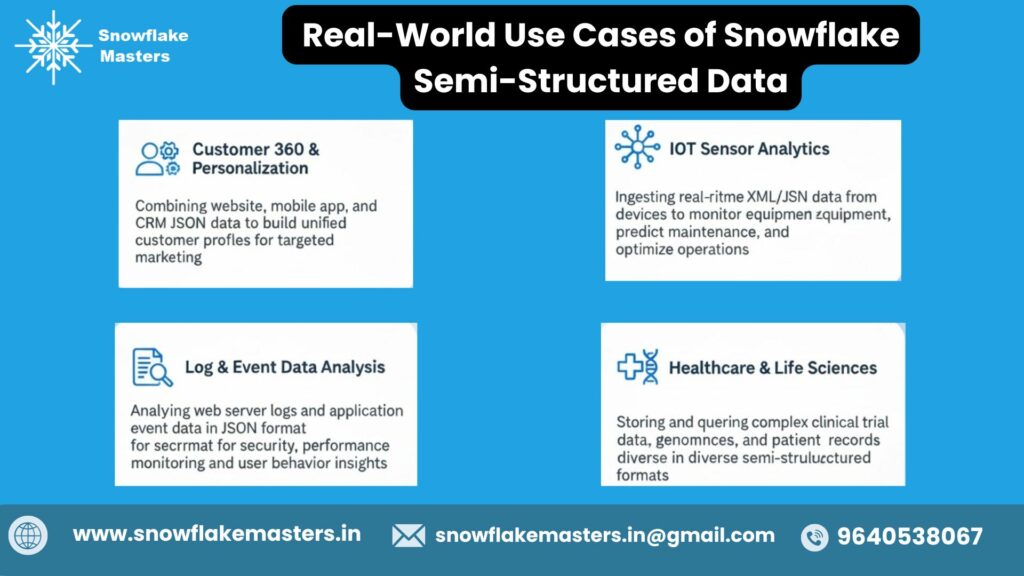
Real-World Use Cases of Snowflake Semi-Structured Data
Semi-structured data is no longer “future data” — it’s core business data. Logs, events, JSON payloads, and machine-generated data power modern analytics, AI, and real-time decision-making.
Snowflake’s native support for JSON, Parquet, Avro, and XML makes it a strong platform for handling these real-world use cases without complex ETL or schema redesigns.
Below are industry-wise examples showing how organizations actually use semi-structured data in Snowflake.
E-commerce – Clickstream Data
What kind of data is this?
Clickstream data captures every action a user performs on a website or app:
- Page views
- Button clicks
- Searches
- Cart additions
- Checkout steps
This data usually arrives as nested JSON events with varying structures.
How Snowflake helps
- Store raw click events directly in a VARIANT column
- Query nested attributes using dot notation
- Use FLATTEN to analyze user journeys step-by-step
- Handle schema changes automatically (new events, new attributes)
Real-world analytics use cases
- Funnel analysis (browse → cart → purchase)
- Abandoned cart detection
- Personalized product recommendations
- Real-time dashboards for conversion tracking
Business impact
- Faster insights without reprocessing data
- Better personalization = higher conversions
- Reduced engineering effort for schema changes
Finance – Transaction Logs
What kind of data is this?
Financial systems generate massive volumes of transaction logs, often stored as:
- JSON event messages
- API payloads
- Streaming data from payment gateways
Each transaction can have:
- Nested metadata
- Variable fields
- Optional attributes (risk score, location, device info)
How Snowflake helps
- Ingest transaction logs in real time using Snowpipe
- Preserve original transaction structure for auditability
- Query specific attributes without flattening entire datasets
- Support regulatory needs with time travel and secure views
Real-world analytics use cases
- Fraud detection and anomaly analysis
- Real-time transaction monitoring
- Compliance and audit reporting
- Customer spending behavior analysis
Business impact
- Faster fraud detection
- Simplified compliance reporting
- Secure access to sensitive financial data
Healthcare – Device & Sensor Data
What kind of data is this?
Healthcare systems generate continuous data from:
- Wearable devices
- Medical sensors
- Monitoring equipment
- IoT-enabled machines
This data is typically:
- High volume
- Time-series based
- Semi-structured or nested
How Snowflake helps
- Store raw sensor payloads without predefining schema
- Scale effortlessly as device counts grow
- Query device metrics only when needed
- Combine sensor data with patient and clinical records
Real-world analytics use cases
- Patient health monitoring
- Predictive maintenance of medical devices
- Early detection of abnormal readings
- Population health analytics
Business impact
- Faster clinical insights
- Improved patient outcomes
- Reduced data engineering overhead
Marketing – Customer Behavior Events
What kind of data is this?
Marketing platforms generate event-based data such as:
- Email opens
- Ad impressions
- Website interactions
- Mobile app events
These events arrive as JSON streams with frequent schema changes.
How Snowflake helps
- Ingest marketing events continuously
- Handle evolving event schemas seamlessly
- Join behavior events with customer master data
- Power advanced segmentation and attribution models
Real-world analytics use cases
- Customer journey analysis
- Campaign performance tracking
- Multi-touch attribution
- Real-time audience segmentation
Business impact
- More accurate targeting
- Higher ROI on campaigns
- Faster experimentation and optimization
Why These Use Cases Matter
Across industries, the pattern is clear:
Challenge | Snowflake Advantage |
Schema changes | Schema-on-read flexibility |
High data volume | Elastic scalability |
Nested structures | VARIANT + FLATTEN |
Real-time ingestion | Snowpipe |
Analytics + AI | One unified platform |
Benefits of Using Snowflake for Semi-Structured Data
Snowflake is purpose-built for handling JSON, Avro, Parquet, and XML at scale—without the complexity of traditional data platforms. Below are the key benefits, explained clearly and optimized for both Google SEO and AI search summaries.
No Complex ETL Required
Snowflake follows a schema-on-read approach, which means you don’t need to define a rigid schema before loading data.
- Load semi-structured data as-is using VARIANT
- No upfront transformations or heavy ETL pipelines
- Faster onboarding of new data sources (APIs, logs, events)
Why this matters:
Data teams can ingest data immediately and decide how to structure it later—saving time, cost, and effort.
High Performance at Scale
Snowflake is designed to process large volumes of nested and semi-structured data efficiently.
- Automatic query optimization
- Independent scaling of compute and storage
- Handles complex JSON queries with consistent performance
Why this matters:
Even deeply nested data can be queried quickly without performance tuning.
SQL-Based Querying (No New Skills Needed)
You can query semi-structured data using standard SQL.
- Dot and bracket notation for nested fields
- Built-in functions like FLATTEN
- No need to learn new query languages
Why this matters:
SQL users can work with JSON and arrays without additional training.
Lower Storage & Compute Costs
Snowflake’s architecture is optimized for cost efficiency.
- Automatic micro-partitioning
- Compressed storage for semi-structured formats
- Pay only for compute when queries run
Why this matters:
You avoid over-provisioning infrastructure and reduce overall cloud spend.
Cloud-Native Architecture
Snowflake is built from the ground up for the cloud.
- Runs seamlessly on AWS, Azure, and GCP
- Zero infrastructure management
- High availability and fault tolerance by default
Snowflake Semi-Structured Data – Learning Roadmap
Learning semi-structured data in Snowflake can feel overwhelming at first — JSON, VARIANT, FLATTEN, Snowpipe, performance tuning.
This step-by-step roadmap breaks everything down into a clear, beginner → advanced learning path so you know exactly what to learn, in what order, and why it matters in real jobs.
This roadmap is designed for:
- Aspiring Data Engineers
- Analytics Engineers
- SQL developers moving to modern cloud data platforms
- Professionals preparing for Snowflake projects or interviews
Why Follow This Roadmap?
- No random tutorials or gaps
- Covers real-world Snowflake use cases
- Optimized for enterprise data workloads
- Builds job-ready, production-level skills
Beginner → Advanced Course Path
Each module builds on the previous one. By the end, you’ll be able to design, load, query, and optimize semi-structured data pipelines in Snowflake with confidence.
Module | Topics Covered | Duration |
Module 1 | Basics of Snowflake & VARIANT | 1 Week |
Module 2 | JSON & FLATTEN Queries | 1 Week |
Module 3 | Data Loading & Snowpipe | 1 Week |
Module 4 | Performance Optimization | 1 Week |
Module 5 | Real-World Projects | 2 Weeks |
Module 1: Basics of Snowflake & VARIANT (Foundation)
Goal: Understand how Snowflake handles semi-structured data internally.
What you’ll learn:
- Snowflake architecture (storage, compute, cloud services)
- What semi-structured data really means
- VARIANT, OBJECT, and ARRAY data types
- Schema-on-read vs schema-on-write
- When to use structured vs semi-structured columns
Module 2: JSON & FLATTEN Queries (Core Skill)
Goal: Query nested data like a pro using SQL.
What you’ll learn:
- Dot notation vs bracket notation
- Reading nested JSON attributes
- Handling arrays using FLATTEN
- LATERAL joins explained simply
- Common query patterns used in production
Module 3: Data Loading & Snowpipe (Ingestion Mastery)
Goal: Build automated pipelines for semi-structured data.
What you’ll learn:
- Loading JSON & Parquet into Snowflake
- COPY INTO best practices
- Internal vs external stages
- Snowpipe architecture & use cases
- Event-based ingestion from cloud storage
Module 4: Performance Optimization (Advanced Skill)
Goal: Make semi-structured queries fast and cost-efficient.
What you’ll learn:
- Query pruning for VARIANT columns
- Using views vs materialized views
- Clustering considerations
- Minimizing FLATTEN overhead
- Cost optimization strategies
Module 5: Real-World Projects (Job-Ready)
Goal: Apply everything in practical, production-style scenarios.
Project examples:
- API JSON ingestion pipeline
- Event data modeling for analytics
- Semi-structured → dimensional model
- Performance tuning case study
- End-to-end Snowflake data flow
Tools Covered
This roadmap focuses on industry-standard tools used in real Snowflake projects.
Snowflake
- Core platform for storage, querying, and optimization
- VARIANT handling, FLATTEN, Snowpipe, and performance tuning
AWS / Azure / GCP
- Cloud storage integration (S3, ADLS, GCS)
- Event-based ingestion concepts
- Real-world cloud architecture exposure
SQL
- Advanced SQL for semi-structured data
- JSON functions and analytical queries
- Performance-aware query writing
dbt (Optional but Powerful)
- Transforming semi-structured data
- Analytics engineering workflows
- Clean, modular data models
Snowflake Semi-Structured Data for Careers & Business
Snowflake’s native support for semi-structured data is more than a technical feature — it’s a career accelerator for professionals and a competitive advantage for businesses. As organizations increasingly work with JSON, Parquet, Avro, and event-based data, Snowflake becomes a critical skill across roles and industries.
For Job Seekers
If you’re building or advancing a career in data, understanding how Snowflake handles semi-structured data can directly impact your job opportunities, salary potential, and long-term growth.
Data Engineer
For Data Engineers, semi-structured data is no longer optional — it’s the norm.
Snowflake allows Data Engineers to ingest raw JSON, Parquet, or event data without defining rigid schemas upfront. This means faster pipelines, fewer failures, and less time spent fixing broken ETL jobs.
Why recruiters value this skill:
- Ability to build schema-on-read pipelines
- Hands-on experience with VARIANT, FLATTEN, and JSON querying
- Strong understanding of streaming + batch ingestion
- Reduced pipeline complexity compared to traditional warehouses
Career impact:
Data Engineers with Snowflake semi-structured expertise are in high demand across SaaS, fintech, e-commerce, and cloud-native companies.
Analytics Engineer
Analytics Engineers bridge raw data and business metrics — and Snowflake makes this role significantly more powerful.
Instead of waiting for upstream schema changes, Analytics Engineers can directly query nested fields, flatten arrays, and model business-ready datasets from semi-structured sources.
Key advantages for this role:
- Faster experimentation with evolving data
- Simplified transformation logic
- Strong compatibility with dbt and modern analytics stacks
- Ability to build metrics directly from JSON event data
Career impact:
Companies prefer Analytics Engineers who can move fast without breaking pipelines, and Snowflake enables exactly that.
Cloud Data Architect
For Cloud Data Architects, Snowflake’s semi-structured capabilities unlock scalable and future-proof designs.
Architects can design systems where raw data is stored once and reused across teams, without constant schema migrations or re-engineering.
Why this matters at the architectural level:
- Supports multi-cloud data strategies
- Reduces long-term data modeling risks
- Enables flexible ingestion from APIs, logs, and SaaS tools
- Aligns with modern data lakehouse patterns
Career impact:
Architects who understand Snowflake’s approach to semi-structured data are trusted to design cost-efficient, scalable, enterprise-grade platforms.
For Businesses
Beyond individual careers, Snowflake’s semi-structured data support directly impacts speed, scalability, and cost efficiency for organizations.
Faster Insights
Traditional systems delay insights because data must be fully modeled before analysis. Snowflake removes this bottleneck.
Businesses can:
- Load raw data immediately
- Query nested attributes on demand
- Iterate faster as requirements change
Business outcome:
Decision-makers get insights days or weeks earlier, leading to better and faster business decisions.
Scalable Analytics
Snowflake separates compute and storage, making it ideal for scaling analytics on semi-structured data.
This means:
- High-volume JSON and event data can be queried without performance loss
- Multiple teams can analyze the same data simultaneously
- No need to pre-aggregate or over-optimize early
Business outcome:
Organizations scale analytics without scaling operational complexity.
Lower Engineering Effort
Rigid schemas increase engineering overhead. Snowflake’s schema-on-read approach dramatically reduces it.
Benefits include:
- Fewer pipeline failures due to schema changes
- Less time spent on data reprocessing
- Reduced dependency on upstream systems
Business outcome:
Engineering teams focus on value creation instead of maintenance, lowering overall data platform costs.
Common Challenges & Best Practices
Working with semi-structured data in Snowflake (especially JSON) is powerful—but it comes with its own set of challenges. In this section, we’ll break down the most common problems data teams face and the best practices you should follow to keep performance high and costs under control.
Challenges
1️ Large Nested JSON Structures
The Challenge:
Semi-structured data often arrives as deeply nested JSON, with multiple levels of objects and arrays. While Snowflake can store this easily using the VARIANT data type, querying deeply nested structures can become complex and slow.
Why it matters:
- Queries become harder to read and maintain
- Extracting values requires long dot or bracket notation
- Overusing FLATTEN on large JSON can explode row counts
Real-world impact:
Data engineers spend more time debugging queries, and analytics teams experience slower dashboards.
2️ Query Performance Issues
The Challenge:
Poorly designed queries on semi-structured data can lead to:
- Full table scans
- Excessive use of FLATTEN
- High CPU and memory usage
Why it matters:
Snowflake charges based on compute usage, not just storage. Inefficient queries directly increase costs.
Common causes:
- Flattening entire JSON documents instead of specific paths
- Not filtering data before flattening
- Querying raw JSON repeatedly instead of curated views
3️Cost Optimization Difficulties
The Challenge:
Semi-structured data queries can unintentionally consume large warehouses for longer durations, leading to higher Snowflake credits usage.
Why it matters:
Without proper optimization:
- Costs grow silently
- Finance teams lose predictability
- ROI on data platforms decreases
Best Practices
1️ Use Selective FLATTEN
Best practice:
Always flatten only what you need, not the entire JSON document.
Why it works:
- Reduces row explosion
- Improves query performance
- Lowers compute consumption
Tip:
Apply filters before or inside the FLATTEN clause whenever possible.
2️.Partition Data Properly
Best practice:
Organize your data using:
- Logical partitions (e.g., date, source system)
- Separate raw and curated layers
Why it works:
- Limits the amount of data scanned per query
- Improves pruning efficiency
- Makes data pipelines easier to scale
Example use cases:
- Partition event data by ingestion date
- Separate high-volume JSON feeds into dedicated tables
3️ Optimize Warehouse Size
Best practice:
Match your warehouse size to your workload.
How to do it right:
- Use smaller warehouses for exploratory queries
- Scale up only for heavy transformations
- Enable auto-suspend to avoid idle costs
Why it works:
Snowflake’s elastic compute allows you to pay only for what you use—but only if warehouses are sized correctly.
Conclusion : snowflake semi structured data
Semi-structured data is no longer an edge case—it’s the default format of modern data. From application logs and APIs to event streams and third-party integrations, JSON, Avro, Parquet, and XML are everywhere. Snowflake’s architecture is purpose-built to handle this reality.
By combining schema-on-read, the VARIANT data type, and powerful querying features like dot notation, FLATTEN, and native file format support, Snowflake removes the traditional complexity of managing semi-structured data. You don’t need to lock yourself into rigid schemas upfront. Instead, you gain flexibility, performance, and scalability—without sacrificing governance or analytics quality.
For data teams, this means:
- Faster ingestion with fewer failures
- Easier handling of evolving data structures
- Simplified pipelines for both batch and streaming data
- Analytics-ready data without heavy pre-processing
Whether you’re a data engineer, analytics engineer, or architect, mastering semi-structured data in Snowflake is a core skill—not an optional one. It directly impacts pipeline reliability, query performance, and how quickly your organization can turn raw data into insights.
Frequently Asked Questions
1️ What is semi-structured data in Snowflake?
Semi-structured data is data that doesn’t follow a fixed table schema, such as JSON, XML, Avro, and Parquet, which Snowflake can store and query efficiently.
2️ How does Snowflake store JSON data?
Snowflake stores JSON data using the VARIANT data type, which preserves the original structure while enabling fast querying.
3️ What is the VARIANT data type in Snowflake?
VARIANT is a flexible Snowflake data type designed to store semi-structured data like JSON, XML, and Avro in native format.
4️ Can Snowflake handle XML and Parquet files?
Yes, Snowflake natively supports JSON, XML, Avro, ORC, and Parquet files without complex preprocessing.
5️ What is the FLATTEN function in Snowflake?
FLATTEN is used to explode arrays or nested objects into rows, making semi-structured data easier to analyze
6️ Is Snowflake good for semi-structured data?
Yes, Snowflake is one of the best cloud data platforms for semi-structured data due to schema-on-read, scalability, and performance.
7️ How do you query JSON in Snowflake?
You can query JSON using dot notation, bracket notation, and the FLATTEN function directly on VARIANT columns.
8️ What are real-world use cases of Snowflake semi-structured data?
Common use cases include API ingestion, event tracking, IoT data, log analytics, SaaS application data, and clickstream analysis.
9️ Does Snowflake require a schema for JSON?
No, Snowflake uses schema-on-read, meaning you don’t need to define a fixed schema before loading JSON data.
10. How is Snowflake better than traditional databases?
Snowflake handles semi-structured data without rigid schemas, scales automatically, and separates compute from storage.
1️1️Can beginners learn Snowflake semi-structured data?
Yes, beginners can easily learn Snowflake because of simple SQL syntax, built-in JSON support, and strong documentation.
1️2️ What jobs require Snowflake semi-structured data skills?
Roles include Data Engineer, Analytics Engineer, Cloud Data Architect, BI Engineer, and Data Analyst.
1️3️ How long does it take to learn Snowflake?
Basic Snowflake concepts can be learned in 2–4 weeks, while advanced semi-structured data skills take 2–3 months.
1️4️ Is Snowflake used in India for data engineering
Yes, Snowflake is widely used in India across IT services, fintech, SaaS, and enterprise analytics teams.
1️5️ What is the best Snowflake course for semi-structured data?
The best course focuses on real-world JSON use cases, VARIANT, FLATTEN, performance optimization, and hands-on projects.