

Performance Optimization Techniques in Snowflake
Snowflake is known for its fast and scalable performance—but real speed comes from how well you design and optimize your queries, data, and warehouses. Whether you are a student learning Snowflake, a data engineer preparing for interviews, or a business using Snowflake in Hyderabad, performance optimization helps you reduce costs, improve query speed, and deliver faster insights.

Optimization Techniques Categorized into 3 Main Areas
Snowflake performance optimization can be clearly understood by dividing it into three core areas. Each area focuses on a different layer of the Snowflake architecture and together they help achieve faster queries, lower costs, and scalable performance. Understanding these categories is important not only for real-world projects but also for Snowflake interviews, certifications, and production workloads.
Query Optimization and Design in Snowflake
Query optimization is the most impactful and easiest way to improve Snowflake performance. Well-written queries reduce data scanning, improve execution speed, and control compute usage.
Key Query Optimization Techniques
- Avoid SELECT
Always select only the required columns. This reduces unnecessary data scanning and improves execution time.
Bad Practice: SELECT * FROM sales_data;
Best Practice:SELECT order_id, order_date, total_amount
FROM sales_data
WHERE order_date >= ‘2024-01-01’;
- Use Efficient WHERE Clauses
Filtering data early helps Snowflake scan fewer micro-partitions.
- Use date filters wherever possible
- Filter on frequently used columns
- Avoid functions on filter columns
- Optimize JOIN Operations
Poor joins can slow down queries significantly.
Best practices include:
- Join on properly indexed or frequently filtered columns
- Reduce data volume before joining
- Avoid unnecessary joins
- Well-optimized joins are critical for enterprise BI reporting.
- Use Query Profile for Performance Analysis
Snowflake’s Query Profile shows exactly where time is spent during query execution.
- Identify slow joins
- Detect large table scans
- Improve execution plans
Storage and Data Structure Optimization
Snowflake manages storage automatically, but data organization still matters for performance and cost efficiency.
Key Storage Optimization Techniques
- Micro-Partition Awareness
Snowflake stores data in micro-partitions. Queries run faster when data is well-organized and filtered efficiently.
- Load data in sorted order
- Avoid random inserts for large datasets
- Use Clustering for Large Tables
Clustering helps Snowflake scan less data for large, frequently filtered tables.
Best use cases:
- Tables containing hundreds of millions or even billions of rows
- Filters on date, region, or customer ID
ALTER TABLE orders CLUSTER BY (order_date);
- Choose Appropriate Data Types
Using correct data types reduces storage size and improves processing speed.
Examples:
- Use DATE instead of VARCHAR for dates
- Use NUMBER with proper precision
- Manage Data Retention and Time Travel
Time Travel is powerful but increases storage usage.
Best practices:
- Use shorter retention for staging tables
- Keep longer retention only for critical data
This helps organizations control Snowflake storage costs.

Warehouse Configuration and Management
Warehouse configuration directly affects performance, concurrency, and cost. Proper configuration ensures Snowflake workloads run smoothly even during peak usage.
Key Warehouse Optimization Techniques
- Choose the Right Warehouse Size
Select warehouse size based on workload type.
- Small: Development and testing
- Medium: Reporting and dashboards
- Large: Heavy transformations and batch jobs
- Use Auto-Suspend and Auto-Resume
Idle warehouses still cost money.
Best practice:
- Enable auto-suspend after 1–5 minutes
- Use auto-resume to restart when needed
This is one of the biggest cost-saving techniques.virtual warehouse optimization
- Enable Multi-Cluster Warehouses for Concurrency
When many users run queries simultaneously, multi-cluster warehouses prevent performance degradation.
Best for:
- BI dashboards
- Shared analytics environments
- Large data teams
- Separate Workloads Using Different Warehouses
Avoid running ETL, reporting, and ad-hoc queries on the same warehouse.
Example:
- ETL warehouse
- Reporting warehouse
- Ad-hoc analytics warehouse
This improves stability and performance across teams.
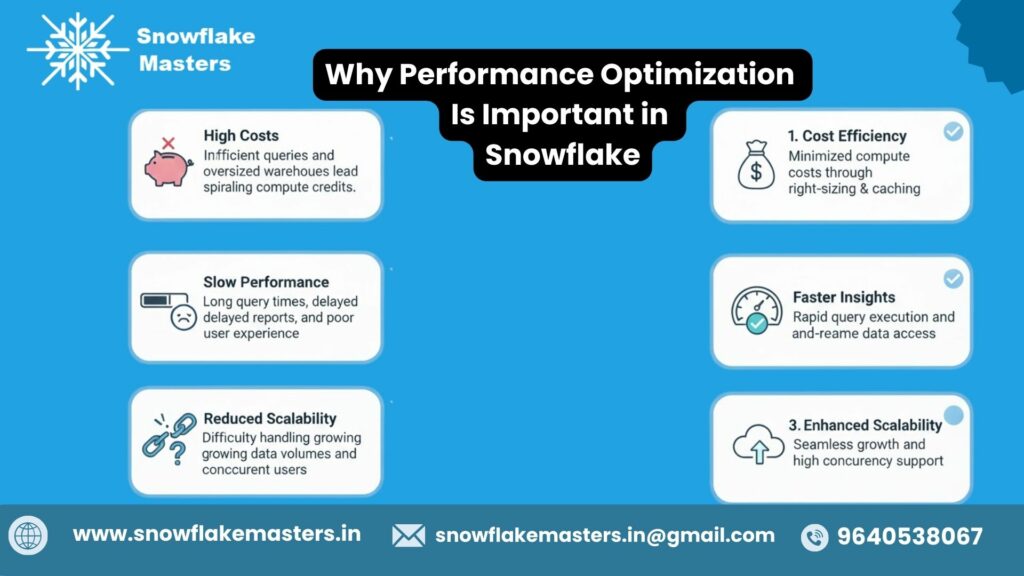
What is Performance Optimization in Snowflake?
Performance optimization in Snowflake means making your data queries run faster, smoother, and at a lower cost by using Snowflake the right way. It focuses on efficient use of compute (virtual warehouses), smart data design, and optimized SQL queries. Snowflake query performanceauto-scaling warehouses
In simple terms: You get results faster without wasting money.Snowflake is already a high-performance cloud data warehouse, but poor query design or wrong configurations can still slow it down. That’s why performance optimization is critical—especially for companies handling large datasets, real-time analytics, and BI dashboards, which is very common among organizations in Hyderabad’s IT and startup ecosystem.
WhyPerformance Optimization Techniques in Snowflake is Important in Snowflake
- Improves query execution speed
- Reduces Snowflake compute costs
- Ensures smooth dashboards and reports
- Handles multiple users without delays
- Builds trust in analytics outputs
How to Optimize Snowflake Performance
Optimizing Snowflake performance is not about one trick—it’s about combining multiple best practices. Below are the most effective and beginner-friendly ways to do it.
1. Use the Right Virtual Warehouse
Snowflake performance depends heavily on the virtual warehouse you choose.
Best practices:
- Use Small warehouses for development and testing
- Scale up only for heavy ETL or large analytics queries
- Avoid running all workloads on one large warehouse
2. Write Efficient SQL Queries
Good SQL equals good performance.
Key tips:
- Avoid SELECT *
- Filter data using WHERE clauses
- Select only the columns you need
- Reduce complex joins when possible
Efficient queries scan less data, which directly improves speed and lowers cost.
3. Take Advantage of Snowflake Caching
Snowflake automatically caches query results.
This means:
- Re-running the same query can return results instantly
- No additional compute cost is used
- Ideal for dashboards and repeated reports
4. Optimize Large Tables with Clustering
For very large tables, Snowflake clustering helps reduce data scanning.
Use clustering when:
- Tables have millions or billions of rows
- Queries filter frequently on the same columns (date, region, ID)
5. Manage Concurrency with Multi-Cluster Warehouses
When many users query data at the same time, performance may drop.
Solution:
- Use multi-cluster warehouses
- Allows Snowflake to handle multiple queries simultaneously
- Prevents query waiting and slowdowns
This is especially useful in shared environments and service-based companies.
6. Monitor and Tune Using Query Profile
Snowflake provides a Query Profile tool to analyze performance.
You can identify:
- Slow joins
- Excessive data scanning
- Inefficient query steps
7. Reduce Unnecessary Data Processing
Avoid heavy transformations inside every query.
Instead:
- Pre-transform data using tasks
- Store cleaned data in separate tables
- Keep reporting queries simple
This improves both performance and reliability.
What is Snowflake Performance Tuning?
Snowflake performance tuning is the process of optimizing how data is stored, queried, and processed in Snowflake so that queries run faster, consume fewer resources, and cost less. In simple terms, it means making Snowflake work smarter, not harder.clustering keys
Performance tuning in Snowflake focuses on:
- Writing efficient SQL queries
- Designing tables properly
- Using the right warehouse size
- Reducing unnecessary data scanning
- Improving query execution time
Because Snowflake uses a cloud-based, distributed architecture, performance tuning is different from traditional databases. You don’t tune hardware like CPU or memory. Instead, you optimize queries, data structures, and compute usage..
Why Snowflake Performance Tuning Matters?
Snowflake performance tuning matters because it directly impacts speed, cost, and user experience.
1. Faster Query Performance
Well-tuned queries return results in seconds instead of minutes. This is critical for:
- Business dashboards
- Data analysts running ad-hoc queries
- Decision-makers who need quick insights
2. Lower Cloud Costs
Snowflake charges based on compute usage. Poorly optimized queries scan more data and run longer, which increases costs.
Performance tuning helps:
- Reduce warehouse run time
- Avoid overusing large warehouses
- Minimize unnecessary compute consumption
3. Better Scalability for Growing Data
As data volume grows, unoptimized queries can break down. Performance tuning ensures Snowflake can:
- Handle increasing data loads
- Support more users concurrently
- Scale smoothly without performance issues
4. Improved User Experience
Slow dashboards and delayed reports frustrate users. Performance tuning ensures:
- Faster BI tool performance (Tableau, Power BI, Looker)
- Smooth reporting experiences
- Higher trust in data systems
5. High-Value Skill for Snowflake Careers
Snowflake performance tuning is a must-have skill for:
- Snowflake developers
- Data engineers
- Analytics engineers
What is Scalability in Snowflake
Scalability in Snowflake means the ability to handle more data, more users, and more queries without slowing down performance. Snowflake is built to scale up or down automatically, so businesses don’t have to worry about infrastructure limits.
There are two types of scalability in Snowflake:
1. Compute Scalability
Snowflake allows you to increase or decrease virtual warehouse size based on workload.
- Run heavy queries on larger warehouses
- Use smaller warehouses for light workloads
- Scale instantly without downtime
2. Concurrency Scalability
Snowflake supports multiple users running queries at the same time without conflicts.
- Multi-cluster warehouses handle high user traffic
- No query blocking or long wait times
Best Practices for Performance Tuning in Snowflake
To get the best performance from Snowflake, you must follow smart tuning practices that reduce data scanning, optimize compute usage, and improve query efficiency.
1. Design Tables with Query Patterns in Mind
- Understand how data will be queried
- Use frequently filtered columns wisely
- Avoid unnecessary columns in wide tables
2. Use Appropriate Warehouse Sizes
- Start small and scale only when needed
- Separate warehouses for ETL, reporting, and ad-hoc queries
- Turn on auto-suspend to avoid idle costs
3. Optimize Joins and Filters
- Join tables on properly filtered datasets
- Apply WHERE conditions before joins
- Avoid joining extremely large tables without filters
4. Use Materialized Views for Repeated Queries
- Store precomputed results for frequently accessed data
- Improve dashboard performance significantly
5. Monitor and Tune Continuously
- Use Query Profile to identify bottlenecks
- Track long-running or expensive queries
- Tune queries as data volume grows
Common Mistakes in Snowflake Performance Tuning and How to Avoid Them
Even though Snowflake is powerful, small mistakes can cause major performance issues.
Mistake 1: Overusing Large Warehouses
Problem: Higher costs with little performance gain
Solution: Use the smallest warehouse that meets your needs
Mistake 2: Ignoring Data Filtering
Problem: Full table scans slow down queries
Solution: Always filter data using WHERE clauses
Mistake 3: Using SELECT *
Problem: Scans unnecessary columns
Solution: Select only required columns
Mistake 4: Poor Table Design
Problem: Inefficient joins and slow queries
Solution: Design tables based on real query usage
Mistake 5: Not Monitoring Performance
Problem: Hidden bottlenecks go unnoticed
Solution: Regularly analyze Query Profile and history
How Snowflake’s Architecture Influences Performance Optimization Techniques in Snowflake
Snowflake’s performance advantage comes from its unique cloud-native architecture.
Key Architectural Components:
1. Storage Layer
- Data stored in compressed, columnar format
- Automatic micro-partitioning
- Optimized for fast data scanning
2. Compute Layer
- Virtual warehouses execute queries
- Compute can be scaled independently
- No resource contention between users
3. Cloud Services Layer
- Manages query optimization, caching, and security
- Handles metadata efficiently
Why This Matters for Performance
- No locking issues between users
- Independent scaling improves response time
- Automatic optimization reduces manual tuning
Conclusion-Performance Optimization Techniques in Snowflake
Snowflake performance optimization is about using the platform intelligently, not forcefully. By understanding scalability, best practices, common mistakes, and Snowflake’s architecture, you can build systems that are fast, cost-efficient, and future-ready.
For students, job seekers, and working professionals are mastering Snowflake performance tuning is a career-boosting skill that is highly demanded across IT services, product companies, and data-driven startups.
If you want hands-on experience, real-world projects, and expert guidance tailored for Hyderabad’s job market, SnowflakeMasters.com can help you learn Snowflake the right way and stand out in your career.
Frequently Asked Questions
1. What are the two types of optimizations?
The two main types of optimization are query optimization and storage optimization.
Query optimization focuses on writing efficient SQL and choosing the right warehouse, while storage optimization focuses on how data is organized, clustered, and stored to reduce scanning.
2. What are the three elements of optimization?
The three key elements of optimization are compute, storage, and query design.
In Snowflake, performance improves when the right warehouse size is used, data is well-organized, and queries are written efficiently.
3. What technique is used to improve query performance in Snowflake for large tables?
For large tables, clustering is the most effective technique.
Clustering helps Snowflake scan fewer micro-partitions when filtering data, which significantly improves query performance on large datasets.
4. How many optimization algorithms are there?
There is no fixed number of optimization algorithms.
Snowflake internally uses multiple cost-based optimization techniques, including pruning, caching, and execution planning, all managed automatically by its query optimizer.
5. What are the two rules of optimization?
The two basic rules of optimization are:
- Reduce the amount of data scanned
- Use compute resources efficiently
Following these rules helps achieve faster performance and lower costs.
6. What is scalability in Snowflake?
Scalability in Snowflake refers to its ability to scale compute resources up or down independently of storage.
This allows businesses to handle increasing data volumes and user workloads without performance issues.
7. Which Snowflake technique can be used to improve the performance of a query?
Techniques such as proper warehouse sizing, query filtering using WHERE clauses, result caching, and clustering are commonly used to improve query performance in Snowflake.
8. How does Snowflake’s architecture influence performance?
Snowflake’s architecture separates compute, storage, and cloud services.
This separation allows multiple users to run queries simultaneously without resource conflicts, resulting in consistent and predictable performance.
9. Does Snowflake automatically optimize queries?
Yes, Snowflake automatically optimizes queries using its built-in cost-based optimizer, which handles tasks like partition pruning, join optimization, and execution planning.
10. How does result caching improve Snowflake performance?
Result caching allows Snowflake to return previously computed query results instantly if the data has not changed, eliminating the need to use compute resources again.
11 How does warehouse sizing affect performance?
Choosing the right warehouse size ensures queries get enough compute power without over-provisioning. Larger warehouses process queries faster, but they also cost more.